Contents
Power BI case study

Clinical Quality & Safety Analytics

Power BI decision-support dashboard for residential aged care

A reporting model that takes quality indicators, clinical incidents, SIRS notifications, consumer experience and workforce data across twelve residential aged care homes, and turns them into something a clinical governance team can act on: which homes warrant review, which indicators are moving, and whether a change is ordinary variation or worth investigating.

Power BIDAXPower Query PythonData modellingSPC Clinical quality analytics
Data provenance

Synthetic demonstration data, generated by script and modelled on the structure of the national aged care quality indicator programme. No real resident, staff or provider data is used anywhere in this project.
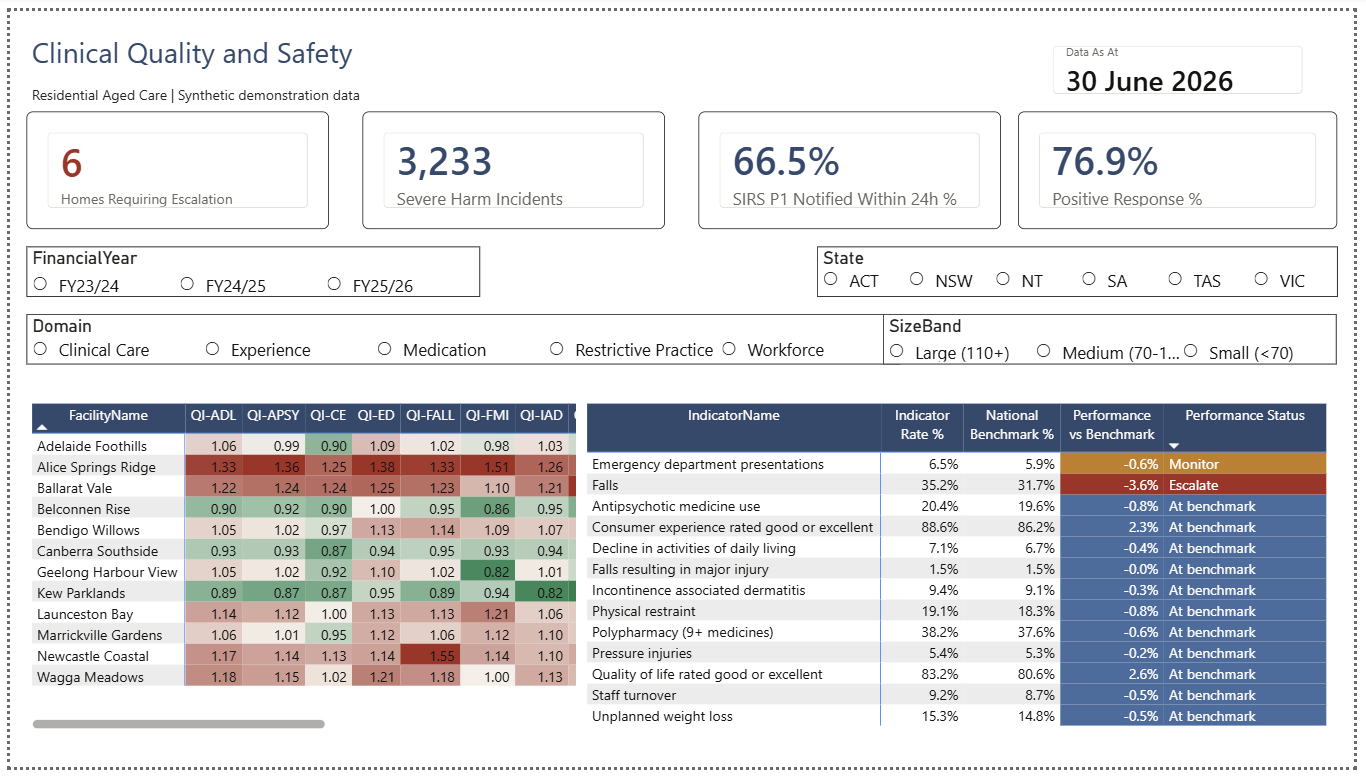
Governance Overview page of the Power BI report, showing summary cards, an indicator scorecard against national benchmarks, and a facility-by-indicator benchmark grid.
13 indicators · 12 facilities · direction-aware escalation status
The governance problem

A clinical governance team receives data from six or seven directions at once: mandatory quality indicators, incident registers, reportable incidents under SIRS, consumer experience surveys, workforce metrics and facility operations. Each arrives on its own cycle, in its own shape, usually in its own report.

Visualising those datasets is not the hard part. The hard part is that a portfolio-level view averages away exactly the variation a governance team needs to see, and a quarterly snapshot shows position without showing direction.

01Which homes need attention first?
02Which indicators are deteriorating?
03Is performance materially different from benchmark?
04Is a change ordinary variation, or potentially meaningful?
05Which facilities should be investigated before the next meeting?
06What specifically is wrong at this home?
01

Governance Overview

Where does the clinical governance team need to focus attention first?

The landing page carries the signals a governance meeting opens with: homes currently requiring escalation, severe-harm incident volume, Priority 1 SIRS notification timeliness and consumer experience. Below them sit the full indicator scorecard against national benchmarks, and a facility-by-indicator grid showing where performance sits relative to benchmark across the whole portfolio.

The page assigns escalation status rather than leaving a reader to interpret thirteen indicators against thirteen benchmarks by eye. Status is decision support for review and investigation, not a clinical judgement.

Governance Overview page of the Power BI report, showing four summary cards, an indicator scorecard against national benchmarks, and a facility-by-indicator benchmark grid.
Governance Overview · all homes · three financial years Click to enlarge
Design decision · benchmark direction

Quality measures do not all move in the same desirable direction. The model holds a direction attribute on the indicator dimension and normalises for it before assigning performance status, so a single measure reads correctly across the whole indicator set.

Falls, pressure injuries, restraint, unplanned weight losslower is better
Consumer experience, quality of lifehigher is better

Without this, a variance measure colours half the scorecard backwards, and the homes performing well on experience appear to be the ones in trouble.

02

Detecting change, not just comparing snapshots

Is a facility showing ordinary variation, or has something meaningfully changed?

A facility can sit close to benchmark in any single reporting period while deteriorating steadily across two years. Benchmark comparison answers where a home is. It does not answer whether it is moving, or whether the movement is larger than that home's own normal variation.

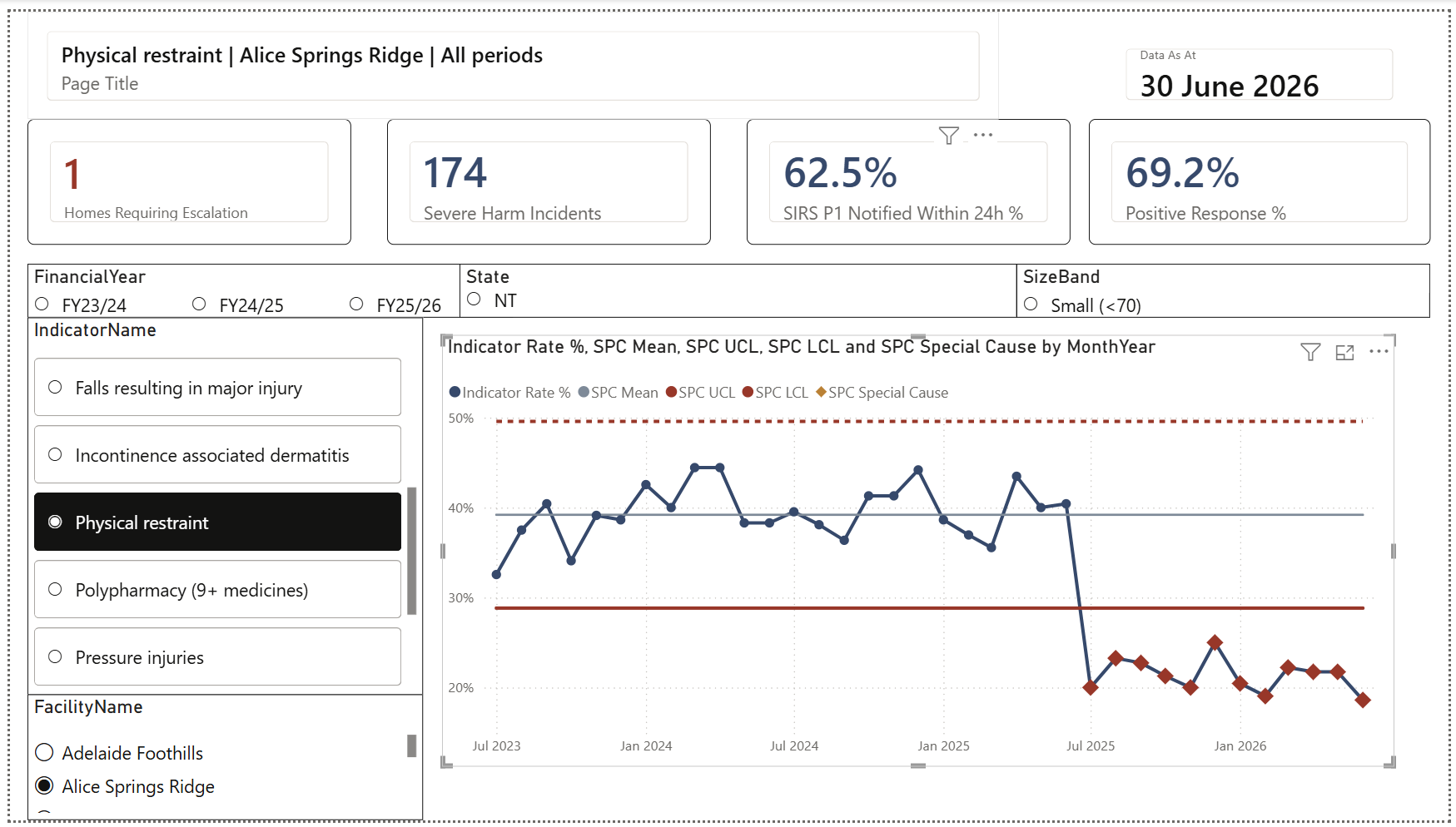
This page lets a user select an indicator, hold a single facility, compare rates across the portfolio, and read the same measure as a control chart. Control limits are three-sigma, calculated from a fixed twelve-month baseline period and extended forward, so the monitoring window is assessed against established behaviour rather than against itself.

Indicator deep dive page showing a statistical process control chart for physical restraint at a single home, with flat control limits and a run of points falling below the lower limit from July 2025.
Indicator deep dive · physical restraint · single facility · SPC with 12-month baseline Click to enlarge
Worked example · what longitudinal monitoring adds

In this dataset, one home's pressure injury rate rises gradually across sixteen months. No individual month reads as exceptional and a quarterly snapshot against benchmark does not make the movement obvious. Monitored as a process against baseline limits, the change becomes visible from mid-period.

A control chart identifies variation that is unlikely to be routine. It does not establish cause, and it is not a clinical finding. It indicates where a governance team may want to look, and when.

03

From portfolio view to facility action

What specifically needs investigation at this home?

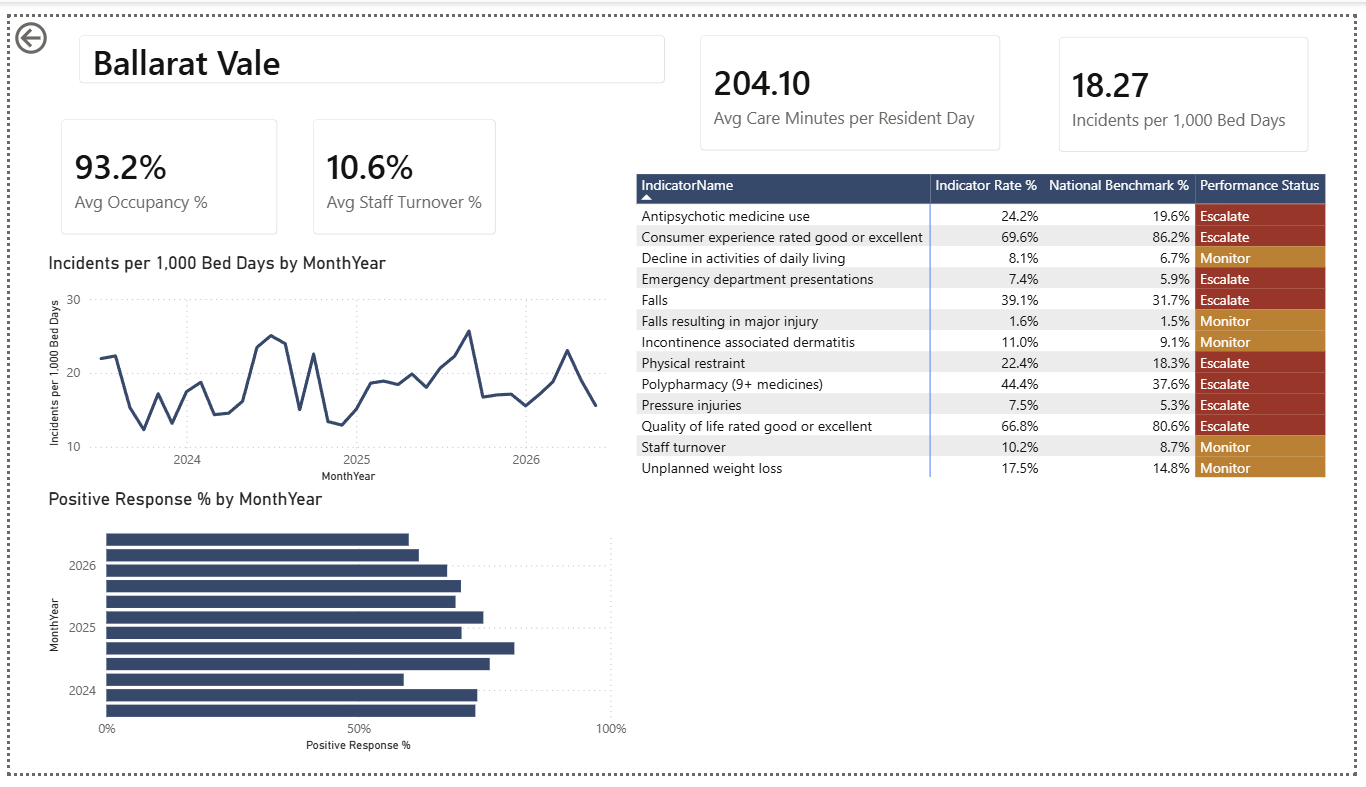
Right-clicking any facility anywhere in the report opens a scorecard filtered to that home. It brings occupancy, care minutes, staff turnover, incident rate per 1,000 bed days, consumer experience and the full indicator set with escalation status onto one page, alongside the longitudinal incident trend.

The intent is to remove the step where someone exports three reports and joins them by hand before a governance meeting. The page supports investigation. It does not recommend clinical action.

Facility scorecard page filtered to a single home, showing occupancy, care minutes, staff turnover and incidents per thousand bed days alongside the full indicator table with escalation status.
Facility scorecard · drill-through from any facility on any page Click to enlarge
04

How the data was built

01Synthetic source datasets
02Power Query cleaning & reconciliation
03Star-schema semantic model
04DAX measures & governance rules
05Power BI reporting layer
06Governance & facility analysis

Data quality

The source data was written to behave like an operational extract rather than a clean export. The Power Query pipeline resolves each defect as a named, readable step rather than a silent type coercion.

  • Mixed date formats parsed per row, not by locale guess
  • 140 duplicate incident records identified and removed
  • 48 facility-name variants reconciled to 12 facilities
  • Non-numeric severity values treated as missing, not coerced to zero

That last one matters more than it looks. An ISR rating is a clinical severity code. Coercing an unreadable value to zero invents a severity level that does not exist and quietly skews every severity distribution downstream. A dashboard that renders correctly is still unsafe if the transformation underneath it is not.

Data model

Star schema with conformed date and facility dimensions. Quality indicators are stored as numerator and denominator rather than a pre-computed rate, so a 48-bed home and a 144-bed home weight correctly when results roll up to state or portfolio level. The benchmark table sits at quarter grain and is joined at query time rather than physically, keeping a mismatched grain out of the model.

11
Tables
29
DAX measures
across the report
5
Report pages
13
Quality indicators
12
Facilities
3
Financial years
  • Row-level security by state
  • Drill-through to facility scorecard
  • Report-page tooltips
  • Marked date table for time intelligence
  • Virtual relationship to the benchmark table
  • Published to the Power BI Service
05

Analytical decisions

Three points in the build where the answer was not obvious and the first attempt was wrong.

Benchmark direction

Quality measures do not all move in the same desirable direction, so a single variance measure cannot be applied across the indicator set without normalising first.

Direction is held as an attribute on the indicator dimension and resolved inside the measure, so adding a new indicator does not require new logic.

Escalation thresholds

I began with a flat percentage-point gap to benchmark, then tested it across every indicator. Because it is an absolute rule, what counts as a breach depends entirely on how common the indicator is.

Falls, major injury
benchmark 1.5% · escalates at 3.04×

Consumer experience
benchmark 86.2% · escalates at 1.04×

Escalation now triggers on absolute or relative deviation, so a large gap on a common indicator and a large proportional gap on a rare one are both caught.

Process monitoring

Point-in-time benchmark comparison cannot reveal a sustained shift. SPC was added to monitor each indicator as a process rather than a position.

Calculating limits across the whole visible period initially found nothing: the change sits inside its own baseline, inflating the standard deviation and widening the limits past the point of detection. Limits are now derived from a fixed twelve-month baseline and extended forward.

Full reporting suite

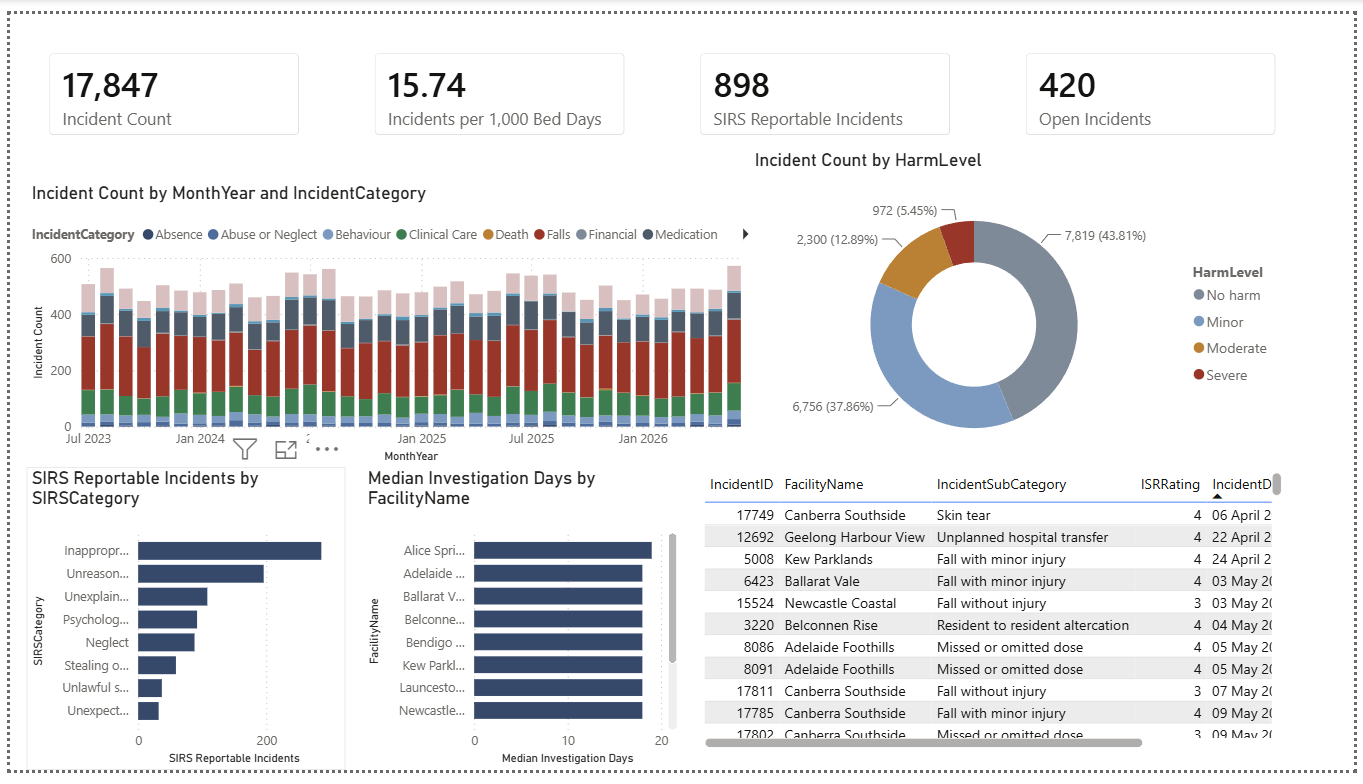
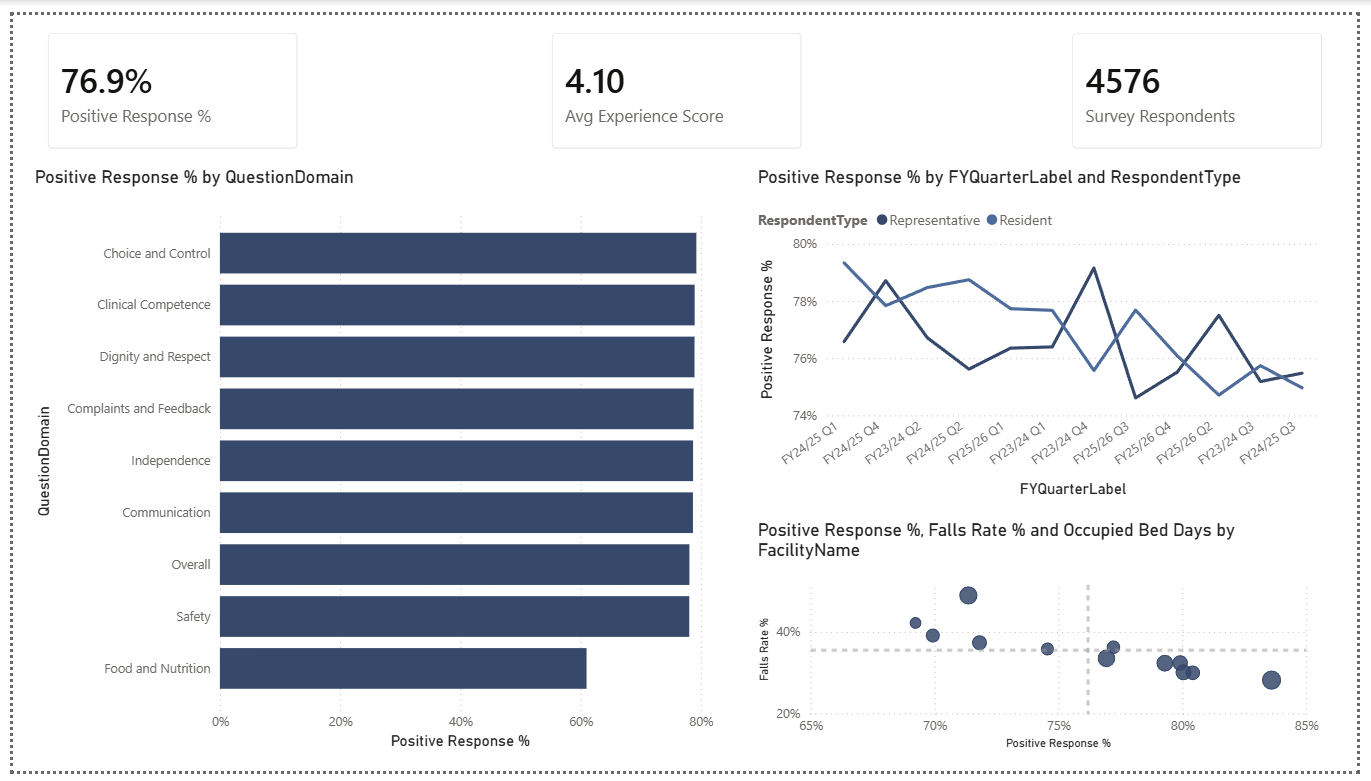
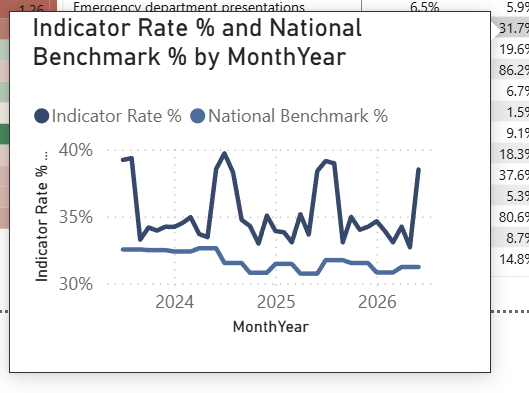
Two further pages cover incident and SIRS reporting and consumer experience, with a report-page tooltip providing twelve-month context on hover throughout.

Incidents and SIRS page showing incident volume by category over time, harm severity distribution, reportable incidents by SIRS category, median investigation days and an open incident list.
Incidents & SIRS · volume, harm severity, notification timeliness, open items
Consumer experience page showing positive response rate by question domain, trend by financial quarter split by respondent type, and a facility scatter of experience against falls rate.
Consumer experience · response rate by domain, trend, facility comparison
Report-page tooltip showing a twelve-month trend of indicator rate against national benchmark.
Report-page tooltip · indicator rate against benchmark on hover
06

What this demonstrates

Clinical quality analytics

Translating quality, safety, experience and workforce datasets into governance-focused reporting.

Power BI development

Semantic modelling, DAX, Power Query, drill-through, row-level security and interactive reporting.

Data quality

Reconciling inconsistent operational data before it reaches a decision-maker, and documenting how.

Benchmarking & trend analysis

Combining benchmark comparison, longitudinal analysis and process monitoring rather than relying on snapshots.

Governance-focused design

Designing around escalation, prioritisation and investigation rather than dashboard aesthetics alone.

Communication

Presenting measures so a non-technical governance stakeholder can see why something has been flagged.

Project limitations

Stated plainly, because a reporting product that does not declare its own boundaries is harder to trust than one that does.

Why I built this

I work at Zipline.io, an AI-enabled compliance platform used by aged care providers, as the technical point of contact for six provider customers. Issues arrive through Intercom as customer-facing symptoms. I investigate the underlying problem, translate it into a technical finding, and escalate what is actionable to engineering.

I also configure, tune, test and validate AI document-analysis workflows across more than 1,000 aged care compliance documents, working with quality and compliance documentation in an audit-exposed environment.

That work gave me the domain, but it is upstream of reporting. This project was built to demonstrate the reporting layer itself: the modelling, the measures, the governance logic and the judgement about when a number deserves attention.

Current role
AI & Data Compliance Officer, Zipline.io
Domain
Aged care compliance, six provider customers
Education
Master of Information Technology, Artificial Intelligence, The University of Melbourne
Location
Melbourne, Victoria