Contents
Product design case study

Redesigning PawHealthAI after launch

What users told me about version one, and the simpler app I rebuilt in response

I designed, built and launched PawHealthAI as a solo developer. Users told me it was confusing. I redesigned the app around that feedback for the April 2026 relaunch.

FigmaReact NativeExpo TypeScriptUX research AI-assisted development
Role and status

Sole designer and engineer. Initial launch in 2025; redesign in April 2026. My latest updates are live on Android and will follow on iOS.
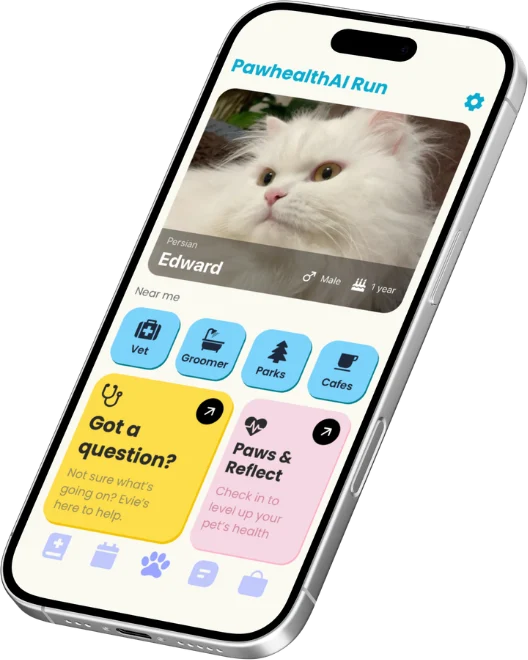
Before Version one home screen on an angled phone: a photo of Edward the cat, four blue Near me tiles, a yellow Got a question card, a pink Paws and Reflect card and five unlabelled tab icons.
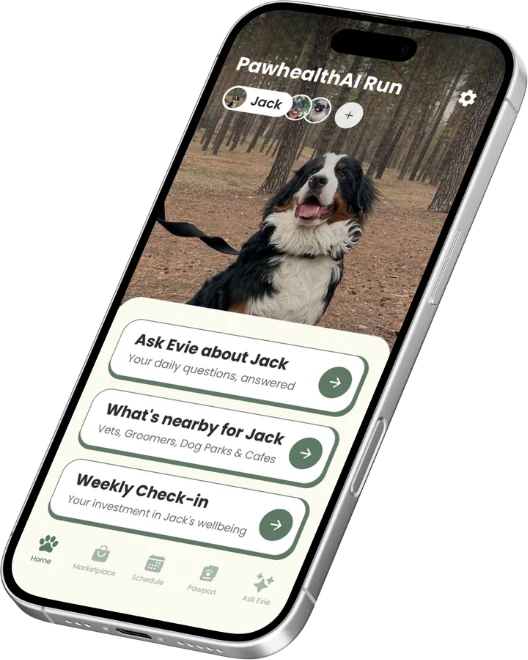
After Redesigned home screen on an angled phone: a full-screen photo of Jack the dog with a pet switcher at the top, three green action rows and a labelled tab bar.

What users told me

  1. The first screens were overwhelming. Too many options were shown at once.
  2. The names did not explain what each feature did.
  3. Getting around was harder than it should be.

None of these were bugs. Everything worked. People just could not tell where to start.

Before Version one home screen: Edward the cat with breed, sex and age on the photo, a Near me row of four blue tiles for Vet, Groomer, Parks and Cafes, a yellow Got a question card, a pink Paws and Reflect card and five unlabelled tab icons.
Version one · 2025
After Redesigned home screen: Jack the dog full screen with a pet switcher at the top, then three rows reading Ask Evie about Jack, What's nearby for Jack and Weekly Check-in, above a tab bar labelled Home, Marketplace, Schedule, Pawport and Ask Evie.
Redesign · April 2026
01

Home: one clear next step

What should someone do first?

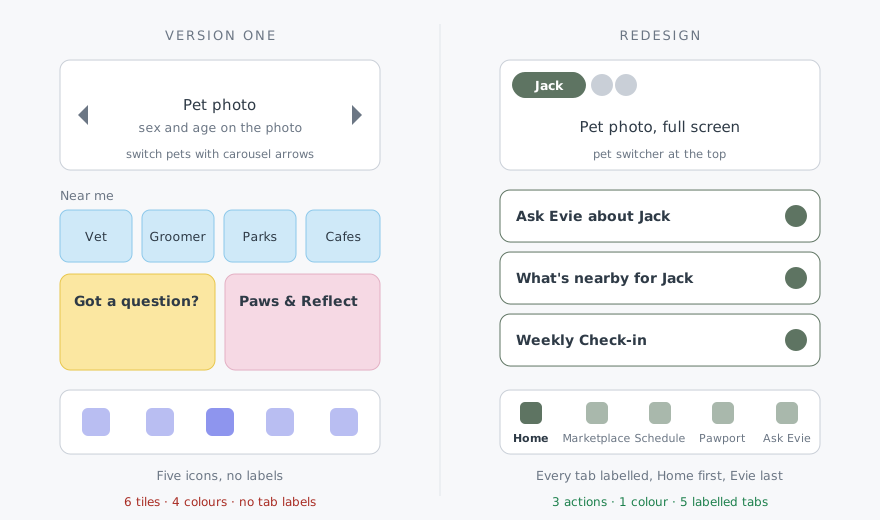
Version one put six tiles and cards on the home screen in four different colours, all competing for attention: four "Near me" shortcuts and two large feature cards. Nothing told an owner where to start.

The new home screen leads with the pet, full screen. Below it are three actions in plain words, each one naming the pet: ask Evie, see what's nearby, do the weekly check-in. One colour, one list, one obvious first step.

Old name, new name and why
BeforeAfterWhy
Got a question?Ask Evie about JackSays who you are asking and which pet it is about
Weekly Paws & ReflectWeekly Check-inPlain words for what it is
Near me, as four separate tilesWhat's nearby for JackOne entry point, with the categories listed underneath
Five tab icons with no labelsHome, Marketplace, Schedule, Pawport, Ask EvieEvery tab says where it goes
02

Naming: say what it does

Would a new user know what this is?

Several features had names that meant something to the team and nothing to a new user. I renamed or relabelled them so each one says what it does, and used the pet's name wherever I could.

Version one home screen with four numbered markers: 1 on the four Near me tiles, 2 on the sex and age details on the photo, 3 on the pet photo where carousel arrows switched pets, 4 on the yellow and pink feature cards.
  1. 01The four separate "Near me" tiles became one row.
  2. 02The sex and age details moved off the home photo.
  3. 03Switching pets moved from carousel arrows to a switcher at the top.
  4. 04Four accent colours became one green palette.
04

Simpler, with nothing removed

Can an app get simpler without losing anything?

No feature was removed in the redesign. Everything version one could do, the new app still does. What changed is how much the home screen asks you to look at.

FigmaDesign
CodexPlanning, coding, debugging
Claude CodePlanning, coding, debugging
GeminiRuns Evie, the in-app assistant
05

Building it alone with AI

I rebuilt the app as a solo developer, using Codex and Claude Code for planning, coding and debugging. Evie, the in-app assistant, runs on Gemini.

The tools made the rebuild fast. The decisions about what to keep, move and rename came from users.

The relaunched home screen for Jack the dog, with three named actions and a labelled tab bar.
The relaunched app · April 2026
06

Result

After the relaunch, customers told me they had a better idea of what to look at and what to use.

This is feedback, not a measured result. Event tracking is being built so the next change can be measured properly.

Deep dive

Onboarding evolution

One part of the app in detail. The relaunch cut onboarding from six steps upfront to two steps plus four. The latest implementation saves completed pages and resumes unfinished setup.

What this demonstrates

01

Listening to users

Treating "confusing" as a design problem to solve, not a user problem.

02

Simplifying

Regrouping, renaming and reordering until the first step is obvious, without removing a feature.

03

Design and build

Figma flows and React Native implementation, by one person.

04

Working with AI

Using tools for speed while keeping the judgement.

Limitations

About

Co-Founder and CTO, PawHealthAI. Sole designer and engineer of the app and website.

I cover the complete design and implementation story in Designing and building PawHealthAI.

Role
Co-Founder and CTO, PawHealthAI
Stack
Figma, React Native, Expo, TypeScript, Supabase
Status
Live on Android, coming to iOS